The conversion funnel
Pick a few steps in order and see how many of the people who entered step one reached the last one, and exactly where they dropped. Each property has one funnel; it is saved where you define it and is the same funnel for everyone on the team.
One property, one funnel#
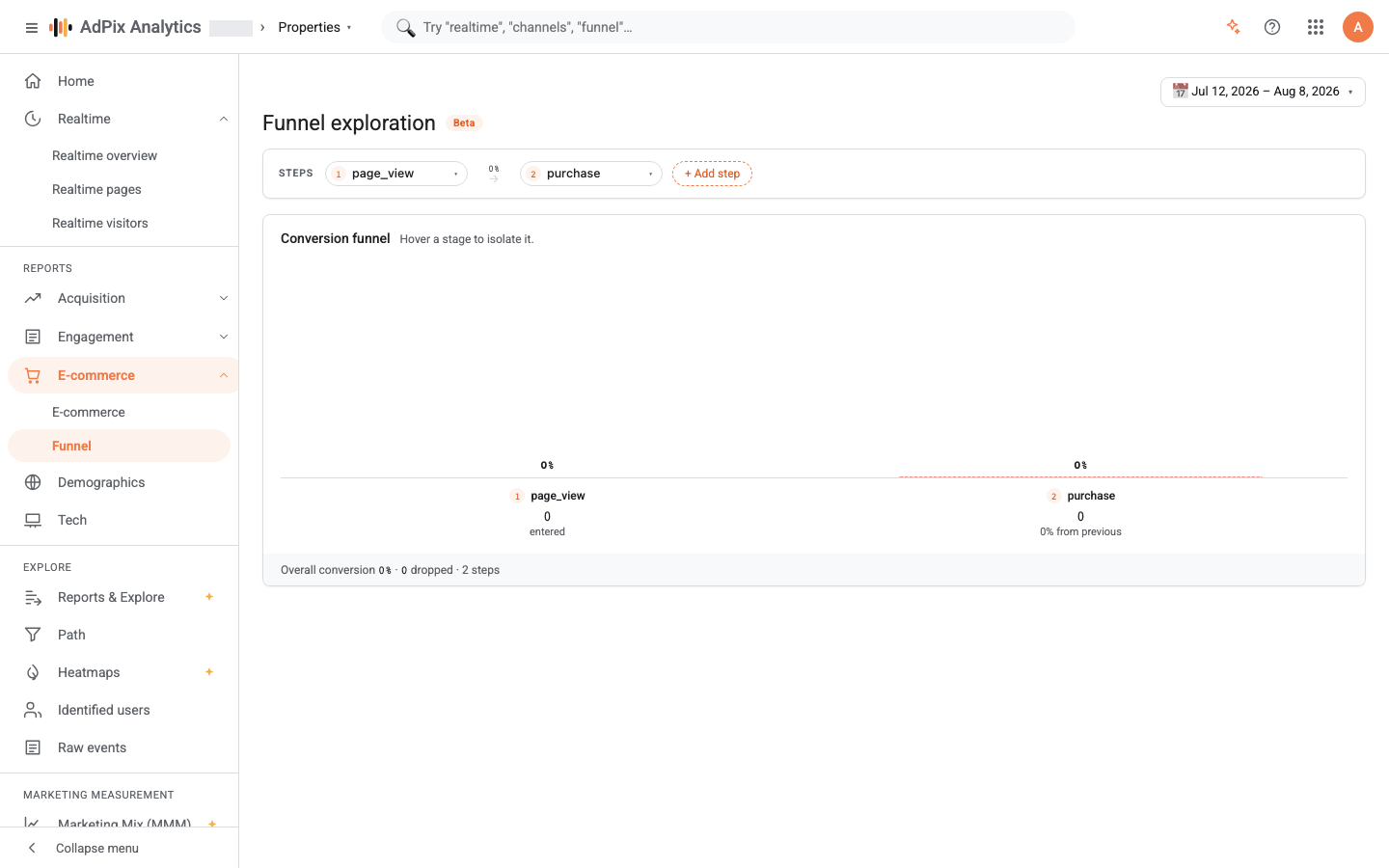
A row of step chips sits at the top of the page; that is where the funnel is defined. Choose each step's event from its dropdown, add a step with Add step, and remove one with the cross on its chip. Two steps are the minimum and eight the maximum.
Every change recomputes immediately and, a moment later, saves onto the property — that is what the "Saving…" and then "Saved" indicator beside the title means. Next time you or any teammate opens this page, this funnel loads. There is no multi-funnel builder and no Run button, and none is needed.
Saving requires the exploration-building capability, which starts at analyst level. With a viewer role you can still change the steps and read the result, but the change does not land on the property and no saved indicator appears.
Where the steps come from#
Each chip's dropdown is filled from two sources:
- the standard events:
page_view,session_start,first_visit,sign_up,login,purchase,add_to_cart,begin_checkout,generate_lead,form_submit; - that property's key events, whatever you have defined.
So if your custom event — demo_requested, say — is not in the list, it has not been marked as a key event yet. Mark it and come back.
The page_view step is matched against the page-view event type rather than an event name, so it catches every page view.
The counting rule#
Three things decide how the numbers on this page read.
Order matters. Someone counts as having reached step three only if they did step one, then step two, then step three, in that order. Other events may happen in between — they are ignored — but the order of the steps is not.
The completion window equals the selected range. The time allowed between step one and the last step is the length of the range you picked in the date picker, floored at one day and capped at one year. A 7-day range means seven-day journeys; a 90-day range means journeys of up to 90 days.
Grouping is by identity, not by browser. The anonymous events of someone who later identified themselves attach to that same person, so a path that began as an anonymous visit and ended in a sign-in and a purchase counts as one person, not two.
Two devices become one person only when the user identified themselves on one of them — a sign-in, an email, a phone number — or when the browser fingerprint stitched them together. If someone researches on a phone and buys on a laptop without signing in, they are still two people: one who entered the funnel and never finished, and one who appears only at the last step. Funnels that include a sign-in step, or a purchase from an identified user, suffer least from this.
The numbers on the chart#
Each column is a step. Its height is that step's share of entry — of step one — and that percentage is printed above the bar. The pink wedge between two columns is the drop-off between them.
Hover a column and that stage is isolated and a box opens with four numbers:
| Label | Meaning |
|---|---|
| Of entry | What share of the people who entered step one reached this step. |
| From previous step | What share of the previous step reached this one. |
| Drop-off | The complement of the line above — those who did not make it here from the previous step. |
| Previous period | This step's count in the comparison period, when Compare is on. |
The strip below the chart sums three things up: overall conversion (the last step's share of entry), how many people dropped across the whole funnel, and the number of steps.
Comparing with the previous period#
Turn Compare on in the date picker and the same funnel, with the same steps, is computed for the previous period as well:
- a dashed outline is drawn beside each column at the previous period's height;
- the percentage-point difference for that stage appears above each column, with a green or red arrow;
- the difference in overall conversion is printed at the end of the bottom strip.
Note that changing the range also changes the funnel's completion window. Comparing a week with a week is sound; comparing a week with a quarter is comparing two funnels with two different windows, and the result misleads.
Accuracy limits#
- Someone who never did step one is not in the funnel at all. The funnel only counts people who reached at least the first step. If you want all traffic as the base, make step one
page_view. - The journey has to fit inside the range. An event before the range starts is not read, and a purchase after the range ends has not happened yet. If your sales cycle is long, widen the range.
- The funnel is not bound to a session. Steps may happen across several separate visits, as long as they stay inside the completion window. That is deliberate: purchases rarely happen on the first visit.
- Step names are literal. An event name is matched in lowercase letters, digits and underscores. If you send an event under a different name, find its row in the Events report and put that exact name in the step.
Make step one page_view and the denominator becomes every visitor to the site, so overall conversion is naturally a small number. To optimise one specific path — product page to payment, say — make step one the event at the start of that path, and the percentages become something you can act on.
Conversion funnel or e-commerce funnel#
Both pages draw a funnel, and they do different jobs:
| Topic | Conversion funnel | The purchase funnel in E-commerce |
|---|---|---|
| Steps | You choose them, 2 to 8 | Four fixed commerce steps |
| Order | Enforced | Not enforced; each step is counted independently |
| Unit counted | The user's resolved identity | The visitor ID |
| Period comparison | Yes | No |
For the shop's overall health, the E-commerce report is quicker. For finding exactly where people drop, this page.
Frequently asked questions#
How long is the funnel completion window?
As long as the range you selected, floored at one day and capped at one year. Set the range to 90 days and a journey that took seventy days still completes. The window used to be hardcoded to seven days, which understated conversion on every longer range.
Why is my custom event missing from the step list?
The list is built from the standard events plus that property's key events. Mark your custom event as a key event and it becomes selectable here.
I changed the steps but nothing was saved. Why?
Saving the funnel needs analyst level or above. With a viewer role your change is applied and computed, but only for as long as the page is open, and the saved indicator never appears.
Step one is smaller than the user count in the Events report. Is that wrong?
No. The funnel groups on resolved identity and the Events report groups on the per-browser ID. One person on two devices is two users there and — if they identified themselves — one person here.
Thanks — your feedback helps us improve the docs.